

Remote access to the UC Irvine Libraries' licensed online resources is available to active UC Irvine faculty, staff, and enrolled students. In order to use these resources, you must be "authenticated" (recognized as a valid user) by the UC Irvine campus network. Your login/password is your UCInetID. To activate your UCInetID, visit the Office of Information Technology (OIT) UCInetID Activation webpage. For further assistance, call OIT at 949-824-2222 or visit the OIT Help Desk page.
Virtual Private Network (VPN) Session Options
UC Irvine
UC Irvine affiliates can use "UCI" and/or "UCIFull" session tunnels for accessing restricted campus resources and certain licensed materials. More information on UC Irvine VPN sessions be found on the OIT VPN help webpage.
Law
Law school community members can use the Law VPN to get to resources that are restricted to the law school. For help, check with Law School Information Technology Services for help with the Law VPN.
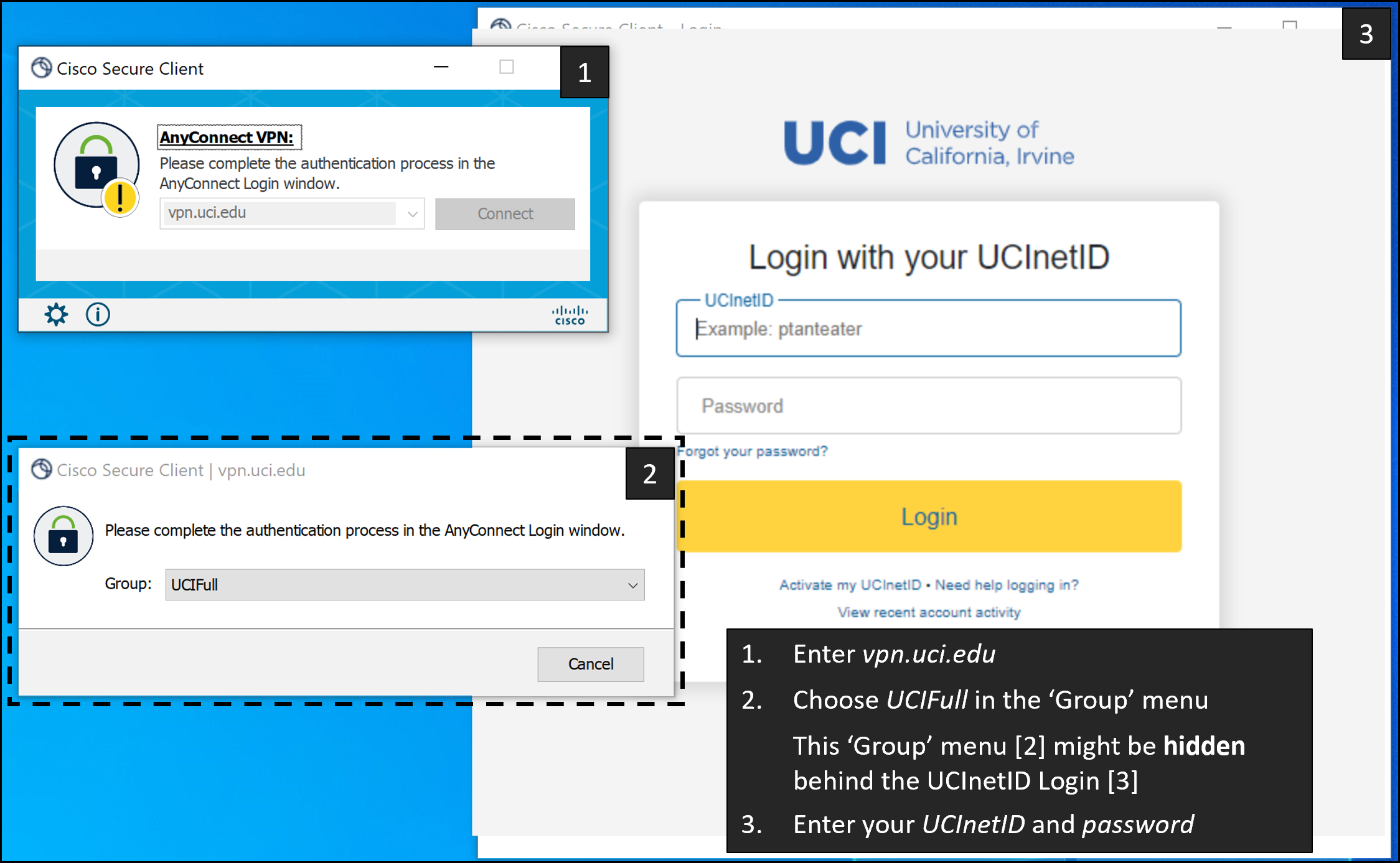
For full access, connect to vpn.uci.edu and choose the group UCIFull.
The "Group" menu may be hidden behind the DUO window.
Move it out of the way or shrink it to be able to change the Group setting to UCIFull.
Software VPN
Desktop VPN
- Visit the software VPN download webpage.
- Important: UC Irvine affiliates must use the address vpn.uci.edu and the UCIFull group to access restricted campus resources and certain licensed materials.
- Note that users who have enrolled in DUO Multifactor Authentication (MFA) will now receive an additional prompt to approve or to enter a DUO code upon logging into the VPN. More information about DUO MFA can be found on the OIT DUO help page.
- Provides access to most licensed online resources.
- Access nonweb based online resources.
- For Mac users, use Chrome or Safari. Firefox may not work due to certificate issues.
Mobile VPN
- Visit the software VPN download webpage.
- Works with Android, Chrome OS, and iOS devices.
- Provides access to most licensed online resources.
- Access nonweb based online resources.
Web VPN
- Visit the Web VPN download webpage.
- Many of the Libraries' databases do not work with the WebVPN. If you are unable to use the software VPN, please contact the UC Irvine Libraries Reference Department for assistance.
- If you experience problems connecting we suggest that you try a different browser. If you continue to experience problems, please contact OIT.
- Can be used within the browser; does not require you to download additional software.
For more information, visit the OIT VPN help webpage.